Integrations & APIs
Building a Customer Portal on Top of FileMaker
By FileMaker Programmer team7 min read
In this article
If your business runs on FileMaker, your customers probably ask your team the same questions every day: Where is my order? Has the job been booked? Can you resend that invoice? Each answer means someone stops what they are doing, opens FileMaker and replies by email or phone.
A FileMaker customer portal lets customers answer those questions themselves — securely, at any hour, from any device — while your staff keep working in the FileMaker system they already know. You don’t need to replace FileMaker to do it. This guide explains how a portal on top of FileMaker works, how to keep it secure, which features are worth building first and what to plan for.
Why build on FileMaker instead of replacing it
Your FileMaker solution already holds the customers, jobs, orders, documents and history the portal needs. It also holds years of business rules your team relies on. Rebuilding all of that just to give customers a login is slow and risky.
Building on top of FileMaker means:
• one source of truth — the portal reads and writes the same records your staff use,
• no double entry — a customer’s change appears in FileMaker immediately,
• staff workflows stay the same — no retraining and no migration project,
• a faster route to value — the first useful version can go live in weeks rather than months.
If one day you do decide to move away from FileMaker, a well-built portal can stay and simply point at the new database. Our guide to FileMaker alternatives covers that bigger decision.
Why not just use WebDirect?
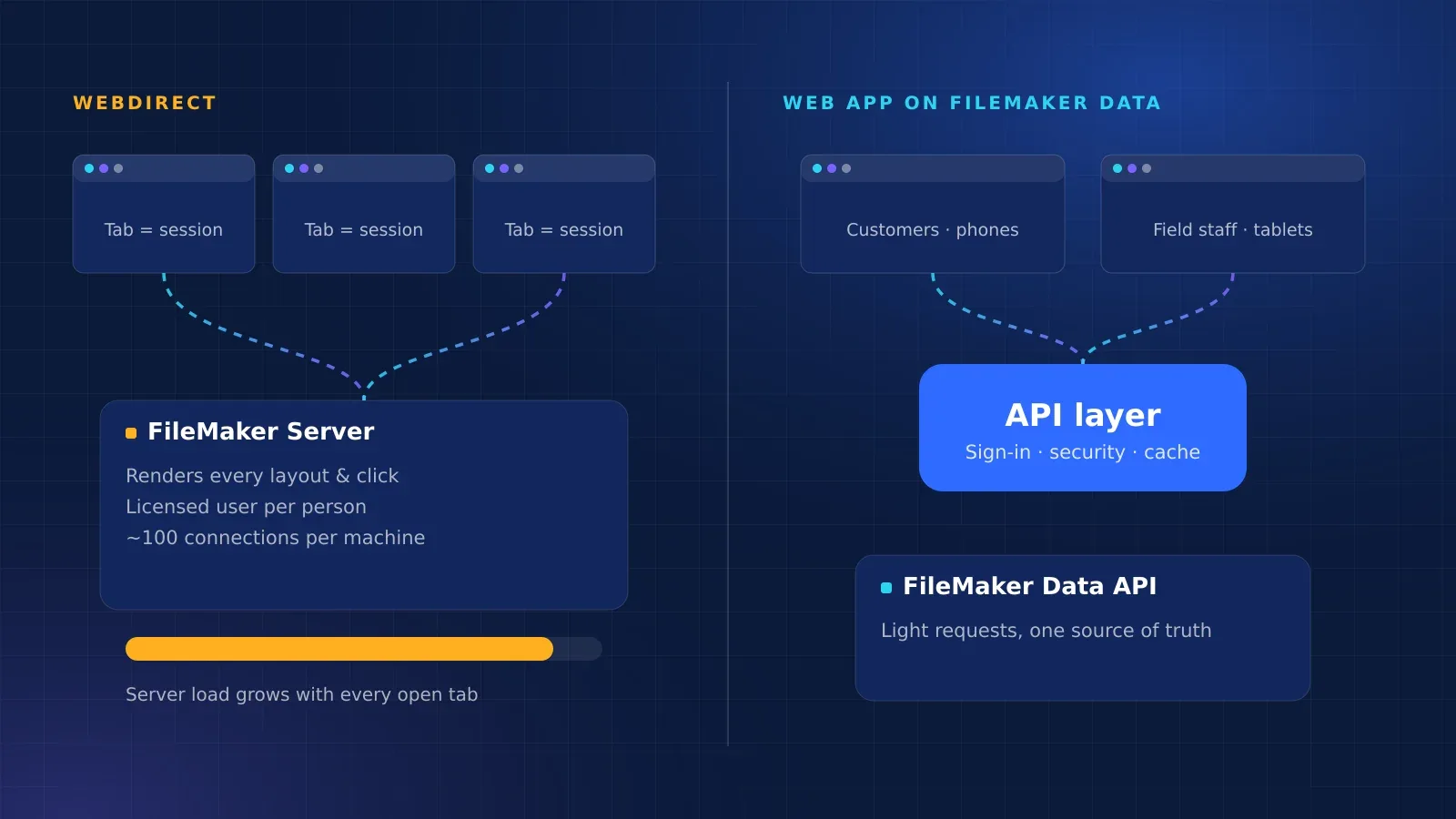
WebDirect lets licensed users open FileMaker layouts in a browser, and it works well for staff. For customers it is the wrong tool: every customer would need a FileMaker licence, the interface would be your internal layouts, and server capacity is limited to a modest number of simultaneous sessions. We explain this fully in FileMaker WebDirect limitations.
How a FileMaker portal works
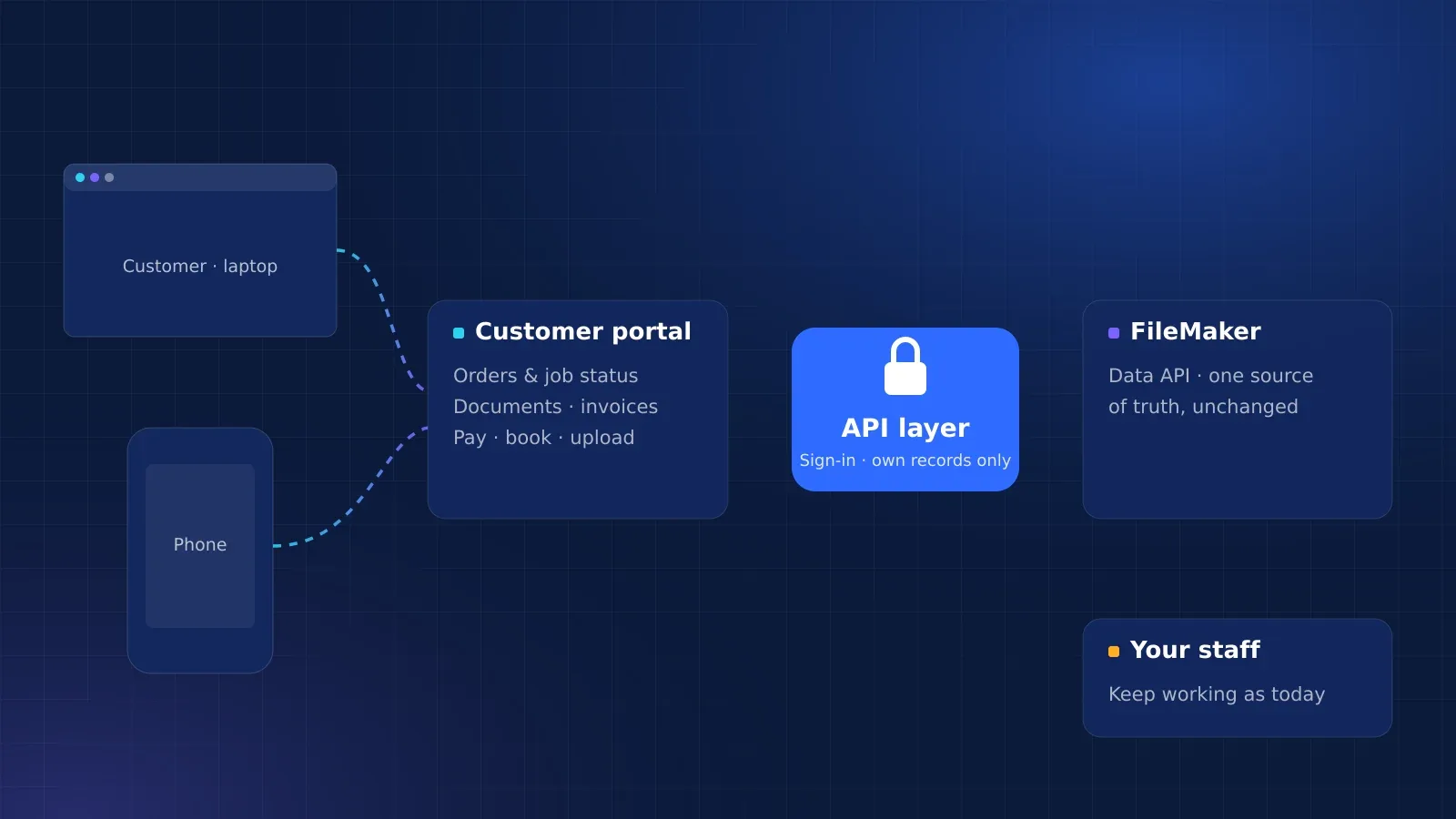
A secure portal has four layers:
1. The portal front end — the pages customers see in their browser or on their phone: sign-in, dashboard, orders, documents, forms. Built with FmBetterForms or as a custom web application.
2. A server-side API layer — a small back end that handles sign-in, checks permissions, validates input and talks to FileMaker. It holds the FileMaker credentials; the browser never sees them.
3. The FileMaker Data API (or OData) — the official, secure way for web applications to read and write FileMaker data on FileMaker Server or FileMaker Cloud.
4. Your FileMaker solution — unchanged for staff, with a few dedicated layouts for the API and scripts that run portal actions.
Because the browser does the presentation work and only asks FileMaker for data, the portal is fast and the FileMaker server isn’t holding a session for every visitor.
Security: the part that must be right
A customer portal exposes business data to the internet, so security is designed in from the first day, not added later.
Authentication
Choose a sign-in method that suits your customers:
• Email and password with secure password hashing, reset links and optional two-factor authentication.
• Magic links — a one-time sign-in link sent by email — for customers who log in rarely.
• Single sign-on for business customers who want to use their company accounts.
Each portal account is linked to a customer or contact record in FileMaker by its ID.
Authorisation and record-level access
The most important rule: a customer must only ever see their own records. Enforce it twice:
• in the API layer, every request is filtered by the signed-in customer’s ID — never by an ID sent from the browser,
• in FileMaker, the Data API account uses a privilege set restricted to the portal layouts, with record-level access rules where practical.
Protecting the system
• HTTPS everywhere, with secure, HttpOnly session cookies.
• Input validation and rate limiting on every endpoint.
• Short-lived, signed links for downloading documents.
• Logging of sign-ins and important actions, with alerts for unusual activity.
• Regular updates, backups and a security-focused review of the FileMaker side.
Features worth building first
Start with the questions customers ask most. Common first releases include:
• Order, job or case status — with dates, progress steps and the next action.
• Documents — quotes, invoices, certificates, reports and photos stored in FileMaker container fields, downloadable on demand.
• Invoices and online payment — show open balances and accept card payments through a payment provider, writing the result back to FileMaker.
• Forms and uploads — new requests, change requests or file uploads that create records directly in FileMaker.
• Bookings — let customers choose from available slots that come from your FileMaker schedule.
• Messages and notifications — email or SMS updates triggered when a status changes in FileMaker.
Performance and scale
A portal is usually far lighter on FileMaker than WebDirect, but good design still matters:
• Create dedicated API layouts that contain only the fields the portal needs.
• Paginate lists and avoid unstored calculations in portal queries.
• Reuse Data API sessions rather than signing in for every request.
• Cache data that rarely changes, such as product lists or reference data.
• Move heavy work to FileMaker server-side scripts called through the Data API.
Claris licences include an outbound data transfer allowance for the Data API and OData — on FileMaker Cloud plans it is 2 GB per user per month. Most portals stay well within it, but document downloads can use a lot. Estimate traffic early, and confirm with Claris or a licensing partner how portal users are treated under your agreement. Our Claris FileMaker pricing guide explains the current plans.
FmBetterForms or a custom front end?
FmBetterForms is a web application framework built specifically for FileMaker. It connects directly to your FileMaker data and logic, so it is usually the fastest and most cost-effective route for portals that follow common patterns.
A custom front end — for example a modern JavaScript application with its own API layer — makes sense when the portal must match your brand exactly, serve very large numbers of users, combine several data sources, or become the first stage of a longer move away from FileMaker.
Both approaches use the same FileMaker Data API, so you can start with one and change course later without touching your staff system.
A phased plan
1. Discovery (1–2 weeks). Agree the audience, the top questions customers ask, data rules and security requirements.
2. First release (typically 4–8 weeks). Sign-in, a dashboard, status pages and document downloads for one customer group.
3. Pilot. Invite a small group of friendly customers, measure fewer support calls and fix what confuses them.
4. Expand. Add payments, forms, bookings and notifications based on what customers actually use.
Timelines vary with the number of features, the state of the FileMaker solution and the integrations involved. If your FileMaker system is old or slow, a short audit first prevents those problems from reaching your customers.
What it costs to run
Running costs are usually modest: web hosting for the portal and API layer, your existing FileMaker licences and hosting, a transactional email service and payment fees if you take payments. Development is the main investment and depends on scope. Planning the first release around the highest-value features keeps it focused.
Frequently asked questions
Can customers log in to FileMaker directly?
They can through WebDirect or FileMaker Go, but each would need a licence and would see your internal layouts. A web portal using the Data API is the standard approach for customers.
Is a FileMaker customer portal secure?
It is when built correctly: credentials stay on the server, every request is filtered by the signed-in customer, traffic is encrypted and FileMaker access is restricted to dedicated layouts and privileges.
Can the portal take payments?
Yes. The portal can show open invoices, take card payments through a payment provider and record the payment and receipt in FileMaker automatically.
Will the portal slow down FileMaker for our staff?
A well-designed portal uses light, targeted Data API requests and is much easier on the server than WebDirect sessions. Monitoring after launch confirms there is no impact.
Does the portal work on mobile phones?
Yes. A modern web portal is designed to be responsive, so customers can use it on any phone, tablet or computer without installing anything.
Can we add a portal if we use FileMaker Cloud?
Yes. The Data API and OData are available on both FileMaker Cloud and self-hosted FileMaker Server.
Conclusion
A customer portal is one of the most practical upgrades a FileMaker-based business can make. Customers get self-service access to their orders, documents and invoices; your team gets fewer routine calls; and FileMaker stays the trusted system behind it all. With a secure API layer, careful record-level access and a focused first release, you can launch quickly without replacing the system your business runs on.
If you would like customers to see their information without calling you, tell us what they ask for most. We will suggest a first release, the right technology and a realistic plan, and build it on your existing FileMaker solution through our FileMaker integration and FmBetterForms development services.
Related articles
Turn ideas into a working system
Share what you’d like to build or improve, and we’ll suggest a practical first step.