Integrations & APIs
FileMaker WebDirect Limitations: When You Need a Real Web App Instead
By FileMaker Programmer team7 min read
In this article
FileMaker WebDirect is one of the platform’s most useful features: publish a solution from FileMaker Server or FileMaker Cloud and your users can open it in a web browser with no installation. For a team of office staff who occasionally work from home, it is often all you need.
Problems start when WebDirect is asked to do jobs it was never designed for — serving customers, running on phones in the field or supporting dozens of simultaneous users on layouts built for a desktop screen. This article explains the FileMaker WebDirect limitations that matter in practice, how to get the most from it, and the signs that you need a real web application instead.
How WebDirect actually works
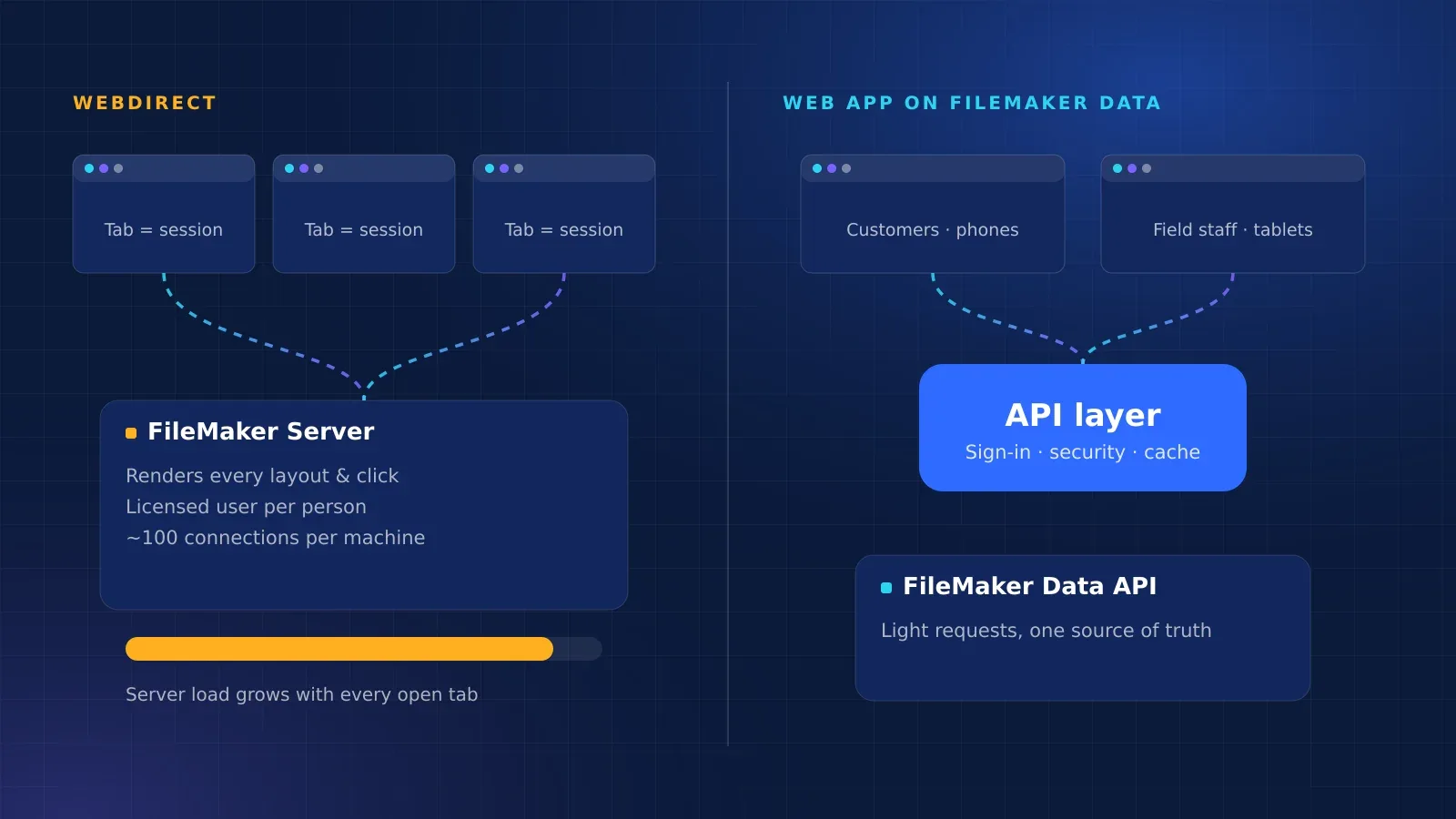
WebDirect is not a website in the usual sense. The FileMaker Server’s Web Publishing Engine runs your solution on the server and renders each layout into HTML in the browser. Every click, field exit and script step is a round trip to the server, which keeps a live session for every open browser window.
That design is what makes WebDirect convenient — your existing layouts and scripts simply work — and it is also the source of most of its limits. The server is doing the work a web browser would do in a normal web app, for every user, all the time.
The limitations that matter in practice
1. Concurrent connections and server load
Claris’s own guidance is that a single server machine generally supports up to 100 WebDirect connections at a time, and each browser window or tab uses its own connection. Larger deployments are possible by adding secondary machines to FileMaker Server, but they need more hardware, more administration and careful testing. FileMaker Cloud deployments are tested to around 100 WebDirect users.
In real solutions the practical number is often lower. Heavy layouts, unstored calculations, portals with many rows and scripts that run on every record change all multiply the server work per user.
2. Every user needs a FileMaker licence
WebDirect users are FileMaker users. Each person who signs in needs a licensed seat, the same as someone using FileMaker Pro. That is fine for staff. It is rarely viable for hundreds of customers who log in twice a month. (Our guide to Claris FileMaker pricing in 2026 explains the per-user plans.)
3. Layouts designed for desktops
WebDirect displays your FileMaker layouts as they are. Layouts designed for a 1920-pixel monitor become cramped, slow and hard to tap on a phone. You can build separate layouts for small screens, but you are then maintaining two interfaces inside one file, without the responsive behaviour a modern web page has.
4. Latency you can feel
Because interactions go back to the server, a slow or distant connection makes WebDirect feel sluggish: typing into a field and tabbing out, opening a popover or sorting a list all wait on the network. Users on mobile data notice this first.
5. No offline use
WebDirect needs a constant connection. If a technician loses signal in a basement, the session can drop and unsaved work may be lost. For field work, FileMaker Go with an offline design or a purpose-built mobile app is a better fit — see FileMaker mobile apps.
6. Feature differences from FileMaker Pro
Some script steps, plugins, menu behaviours and printing options behave differently or are not supported in WebDirect. Printing usually goes through a generated PDF. Solutions that grew up in FileMaker Pro often need testing and adjustment, script by script, before they are reliable in the browser.
7. Not built for the public web
WebDirect pages are application sessions behind a sign-in. They cannot be indexed by search engines, are hard to brand fully, and are not intended for anonymous visitors. Product catalogues, booking pages, public forms and marketing content belong on a normal website.
8. Sessions and time-outs
Each session holds server resources until it ends. Users who leave tabs open, or who refresh and start a new session, consume connections. Session time-outs help, but they also log people out mid-task if set too short.
Getting the most from WebDirect
If WebDirect is the right tool for your users, these steps make a big difference:
• Design dedicated web layouts with fewer objects, no heavy portals and fixed widths that suit a laptop or tablet.
• Remove unstored calculations and summaries from list views; calculate on demand or store results with scripts.
• Keep scripts server-friendly: avoid loops over found sets in the browser session where a server-side script (Perform Script on Server) can do the work.
• Limit open windows and close sessions cleanly with a sign-out script.
• Size the server properly and monitor it. A FileMaker system audit will show where the load comes from.
• Stay current. FileMaker 2026 added automatic recovery for the Web Publishing Engine and progress towards WCAG 2.1 accessibility in WebDirect.
Signs you need a real web app instead
WebDirect is the wrong tool when one or more of these is true:
• External users — customers, suppliers, members or patients need their own access.
• User numbers are growing past what one server comfortably serves, or are unpredictable.
• Mobile-first use — people mainly work on phones, including Android devices.
• Speed and experience matter — the interface has to feel like a modern app, not a desktop database in a browser.
• Public or SEO-relevant pages — anything that should appear in Google.
• Payments, bookings or self-service where a confusing interface costs you revenue.
What “a real web app” means for a FileMaker business
A web app does not have to mean replacing FileMaker. There are three common patterns.
Option 1: A web front end on FileMaker data
Staff keep using FileMaker. A web application handles external or mobile users, reading and writing FileMaker data through the FileMaker Data API or OData via a secure server-side layer. The browser runs the interface, so the FileMaker server only answers data requests. FmBetterForms is a fast way to build this kind of app on FileMaker; a custom front end is another. Our guide to building a customer portal on top of FileMaker covers the architecture in detail.
Option 2: A hybrid that grows over time
Start with one web module — for example job status for customers — and add more as needs grow. Data stays in FileMaker, so there is no big-bang migration and no double entry.
Option 3: A full custom web application
When the web side becomes the core of the business, a custom web application with its own database may be the right long-term destination. That usually involves moving data to a SQL database; see migrating FileMaker data to PostgreSQL and what a FileMaker-to-web-app migration costs.
WebDirect vs a web app at a glance
WebDirect | Web app on FileMaker data | |
Setup effort | Low — uses existing layouts | Medium — new interface to build |
Users | Licensed staff | Staff, customers, partners |
Mobile experience | Desktop layouts in a browser | Designed for phones and tablets |
Server load | Session per user on the server | Light API requests |
Search engines | Not indexable | Public pages can be indexed |
Best for | Internal access from anywhere | External users and modern UX |
Frequently asked questions
How many users can FileMaker WebDirect handle?
Claris states that a single server machine generally supports up to 100 WebDirect connections, with more possible using multiple machines. Real capacity depends on how heavy your layouts and scripts are, so test with realistic use.
Is WebDirect suitable for a customer portal?
Usually not. Each customer would need a licensed seat and the interface is your internal layout. A web portal using the Data API is a better fit for customers.
Does WebDirect work on iPhone and Android?
It runs in mobile browsers, but layouts designed for desktop are hard to use on phones and need a constant connection. FileMaker Go (iPhone and iPad) or a web app is usually a better mobile option.
Why is WebDirect slow?
Every interaction goes to the server, so latency, heavy layouts, unstored calculations and long scripts all slow it down. Dedicated web layouts and server-side scripts help considerably.
Can we use WebDirect and a web app together?
Yes. Many businesses keep WebDirect or FileMaker Pro for staff and add a web app for customers or field workers, both working on the same FileMaker data.
Conclusion
WebDirect is a quick, practical way to give licensed staff browser access to a FileMaker system. Its limits — connections per server, per-user licensing, desktop-shaped layouts, latency and no public access — become real constraints when you need external users, mobile-first work or a modern experience.
If you are at that point, you don’t have to choose between WebDirect and a full rebuild. Tell us how your users work and we will help you decide whether to optimise WebDirect, add a web layer on top of FileMaker, or plan a custom web application.
Related articles
Integrations & APIs
Building a Customer Portal on Top of FileMaker
Read article
Integrations & APIs
Connecting FileMaker with Web Applications, APIs, and AI Automation
Read articleTurn ideas into a working system
Share what you’d like to build or improve, and we’ll suggest a practical first step.