Development process
Migrating FileMaker Data to PostgreSQL: Steps, Pitfalls and Timeline
By FileMaker Programmer team8 min read
In this article
- First decide what “migration” means for you
- Step 1: Audit the FileMaker solution
- Step 2: Design the PostgreSQL schema
- Step 3: Extract the data
- Step 4: Transform and load
- Step 5: Validate before anyone relies on it
- Step 6: Rebuild the logic that lived in FileMaker
- Step 7: Plan the cut-over
- Common pitfalls
- How long does it take?
- A lower-risk alternative: migrate in stages
- Frequently asked questions
- Conclusion
PostgreSQL is a common destination when a business outgrows a FileMaker-only system — usually because a web application, a reporting platform or a development team needs the data in a standard SQL database. Moving the data is very achievable. Doing it without losing history, breaking relationships or surprising users takes planning.
This guide sets out how to migrate FileMaker to PostgreSQL in practical steps, the FileMaker-specific pitfalls we see on real projects, and how long each stage typically takes. It focuses on the data. Rebuilding screens and business logic is a separate workstream, covered at the end.
First decide what “migration” means for you
There are three different projects that all get called a migration:
1. Full replacement. PostgreSQL becomes the database, and a new application replaces FileMaker entirely.
2. FileMaker on top of PostgreSQL. Data moves to PostgreSQL, while some FileMaker screens keep working against it through External SQL Sources (ESS). PostgreSQL is not one of the SQL sources Claris certifies natively; it has typically been connected through a third-party ESS adapter, and this route is not available on FileMaker Cloud. Check Claris’s current supported-sources list and test carefully before relying on it.
3. Synchronisation. FileMaker stays the system staff use, and selected data is copied to PostgreSQL for a website, analytics or another application.
The steps below apply to all three; the scope and cut-over differ. If you are still weighing up platforms, read our honest guide to FileMaker alternatives first.
Step 1: Audit the FileMaker solution
You cannot migrate what you haven’t mapped. Produce an inventory of:
• every table and table occurrence, with record counts,
• every field: type, storage options, validation, auto-enter options and whether it is a calculation, summary or global,
• relationships, including multi-key and cartesian joins,
• value lists and where they are used,
• container fields: how many, total size, embedded or stored externally,
• scripts and triggers that change data, and integrations that read or write it,
• accounts and privilege sets, especially record-level access rules.
The Database Design Report or a saved XML copy of the file makes this much faster. A FileMaker system audit at this stage also highlights data quality problems before they reach the new database.
Step 2: Design the PostgreSQL schema
Don’t copy FileMaker tables one-to-one. Use the move to fix the structure.
Map the field types
FileMaker | PostgreSQL |
Text | text (or varchar with a real limit) |
Number | numeric, integer or boolean, depending on use |
Date | date |
Time | time |
Timestamp | timestamp or timestamptz (decide the time zone rule) |
Container | file in object storage + metadata row, or bytea for small files |
Calculation (stored) | generated column, view or application logic |
Calculation (unstored) / Summary | view, query or application logic |
Keys and relationships
Give every table a proper primary key — a UUID or an identity column — and keep the original FileMaker ID in a legacy_id column so you can trace and re-run imports. Turn FileMaker relationships into foreign keys with explicit constraints, and add indexes for the columns you filter and join on.
Repeating fields, value lists and globals
Repeating fields become child tables. Value lists become lookup tables or check constraints. Global fields used as settings become a small configuration table. Multi-line keys — return-separated lists of IDs used in relationships — become junction tables.
Step 3: Extract the data
There are several reliable ways to get data out of FileMaker:
• Export to CSV or tab-separated files from scripts, one file per table. Simple and transparent; ideal for one-off migrations.
• ODBC/JDBC. FileMaker can act as an ODBC or JDBC data source when sharing via ODBC/JDBC is enabled, so ETL tools and scripts can read tables directly with SQL.
• The FileMaker Data API. Useful for incremental extracts and ongoing synchronisation, especially when FileMaker is hosted on FileMaker Cloud.
Container fields need their own export script that writes each file to disk with a predictable name — for example the record’s legacy ID — so the files can be uploaded to object storage and linked to the right rows.
Step 4: Transform and load
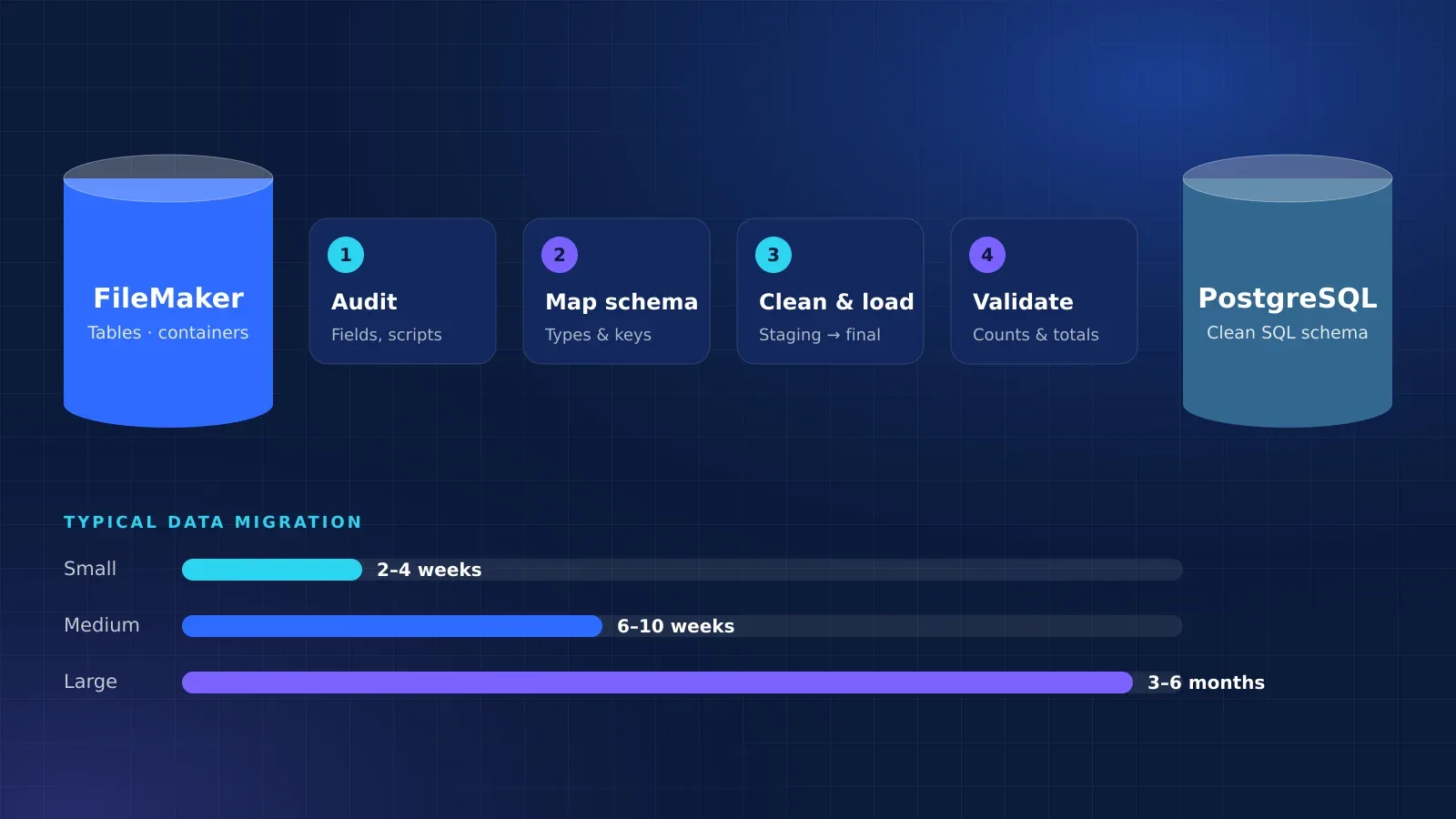
Load raw exports into a staging schema first, then transform into the final tables with SQL. Keeping staging and final separate lets you re-run the transformation as often as needed.
During transformation:
• Fix encoding and line breaks. FileMaker stores line breaks inside fields as carriage returns; convert them to the line feeds most applications expect, and make sure everything is UTF-8.
• Convert types strictly. Numbers stored in text fields, dates typed in different formats and placeholder values such as “n/a” will fail to load — or worse, load wrongly — if you don’t handle them.
• Resolve orphans. Child records whose parent no longer exists must be fixed, archived or dropped deliberately, not silently.
• De-duplicate. Customers and contacts entered twice are common; decide the merge rules with the business.
• Load in dependency order — parents before children — using PostgreSQL’s COPY command or an ETL tool for speed.
Step 5: Validate before anyone relies on it
Validation is where migrations earn trust. At minimum:
• compare record counts for every table,
• compare totals that matter — invoice amounts, stock quantities, balances — between FileMaker and PostgreSQL,
• check that every foreign key resolves,
• spot-check a sample of real records with the people who know them,
• run your most important reports on both sides and compare the results.
Script these checks so they run after every trial migration, not only once.
Step 6: Rebuild the logic that lived in FileMaker
FileMaker solutions keep a lot of behaviour close to the data: auto-enter serial numbers, lookups, validation rules, script triggers and calculated fields. In PostgreSQL that logic moves to constraints, defaults, triggers, views and — mostly — application code. List every rule during the audit and decide where each one will live, or the new system will quietly accept data the old one rejected.
Security moves too. FileMaker privilege sets and record-level access become database roles, row-level security policies and checks in the application.
Step 7: Plan the cut-over
• Rehearse. Run at least two full trial migrations on a copy of production data and time them.
• Freeze and delta. Agree a short freeze window, take a final export and load only what changed since the last rehearsal.
• Keep a rollback. Keep the FileMaker system read-only and available until the new system has run a full business cycle — typically a month-end.
• Communicate. Tell users exactly when to stop, when to start and who to call.
Common pitfalls
• Treating calculation fields as data. Exporting unstored calculations captures a snapshot, not the rule. Rebuild the rule.
• Ignoring time zones. FileMaker timestamps carry no time zone. Decide what they mean before converting to timestamptz.
• Underestimating containers. Gigabytes of documents and images often take longer to move and verify than all the other data.
• Hidden business rules in scripts. A script that “just updates the status” may also send an email, write a log and update stock.
• Big-bang migrations without rehearsal. The first full run always finds surprises; make sure it isn’t the live one.
• Forgetting integrations. Accounting links, web forms and reports pointing at FileMaker must be redirected or rebuilt.
How long does it take?
Timelines depend far more on data quality and logic than on record counts. As a guide for the data migration itself:
Solution | Typical data migration |
Small and tidy (around 10–20 tables, few containers) | 2–4 weeks |
Medium (30–80 tables, containers, some cleanup) | 6–10 weeks |
Large or messy (100+ tables, heavy logic, several integrations) | 3–6 months |
Rebuilding the application on top of PostgreSQL is usually the larger part of the overall budget. Our article on what a FileMaker-to-web-app migration costs breaks that side down.
A lower-risk alternative: migrate in stages
You don’t have to move everything at once. Many businesses start by synchronising selected tables to PostgreSQL for a web portal or reporting, keeping FileMaker as the main system for staff. Modules then move one at a time as the new application takes over. This spreads cost, keeps the business running normally and lets you prove each step before taking the next. A web layer such as a customer portal on top of FileMaker is often the first stage.
Frequently asked questions
Can FileMaker connect directly to PostgreSQL?
FileMaker can use SQL databases as External SQL Sources, but PostgreSQL isn’t among the sources Claris certifies natively. It has typically required a third-party ESS adapter and is not available on FileMaker Cloud. Many projects use exports, ODBC or the Data API instead.
Will we lose data history in the migration?
Not if the history is in FileMaker records. Created and modified timestamps, audit logs and related records can all be migrated; keep the original FileMaker IDs to trace every row.
What happens to our container fields?
Usually each file is exported, uploaded to object storage and linked to its row with a URL or path plus metadata such as file name, type and size. Small files can be stored in the database itself.
Can we keep using FileMaker during the migration?
Yes. Staff keep working normally until the cut-over; the final step loads only the changes made since the last trial run.
Do we need to rebuild our scripts?
Yes. FileMaker scripts don’t run on PostgreSQL. Their rules move into database constraints and triggers, and into the code of the new application.
Conclusion
Migrating FileMaker data to PostgreSQL is a well-understood process: audit, design a better schema, extract, transform in staging, validate rigorously, rebuild the logic and rehearse the cut-over. The pitfalls are predictable — calculations, containers, time zones, hidden script logic — and manageable when they are planned for.
If you are preparing a move, talk to us about your FileMaker system. We know FileMaker solutions from the inside, so we can map what really needs to move, plan a staged or full migration, and build the custom web application that replaces it — or keep FileMaker running alongside it for as long as it makes sense.
Related articles
Turn ideas into a working system
Share what you’d like to build or improve, and we’ll suggest a practical first step.